Release Date: 2026-10-11
New Features
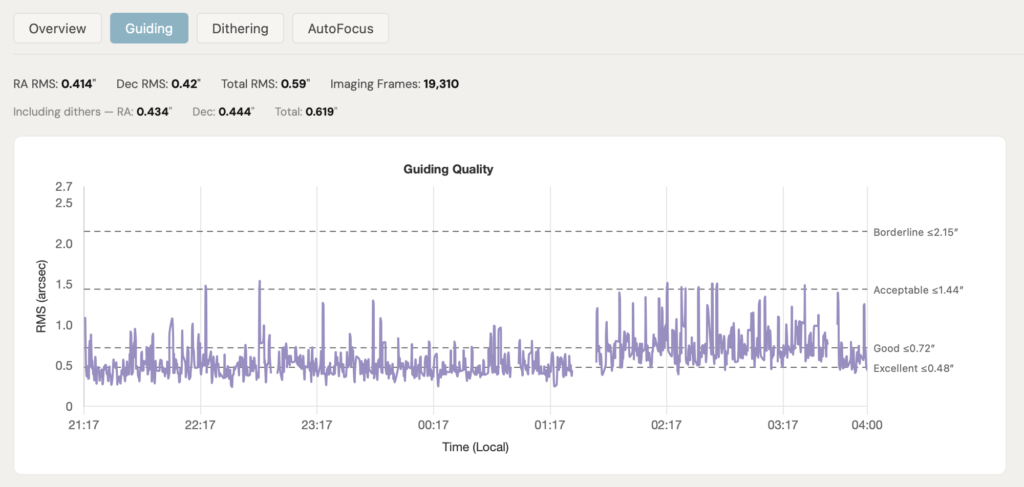
- Guiding quality rating – your guiding RMS now gets a rating (Excellent, Good, Acceptable, Borderline or Unusable) based on the image scale of the rig you used. The rating shows in the journal session summary and in the session report. When you enter a guiding RMS in the session form, you also see the limits for each rating, with the matching one highlighted. Below 1.0″/px the limits no longer get stricter, because seeing becomes the limit.
- Guiding Quality chart – the journal Logs > Guiding tab and the session report show a new chart of your total RMS against the session’s limits. Dither and settle frames are left out, so the chart only reflects the frames you actually imaged.
- Inactive rigs – you can now mark a rig as inactive with the new Active checkbox in the rig settings. Inactive rigs stay in your rig list (greyed out, with an “Inactive” tag), but the Rig Data tab, the session rig selector, the framing tool, the mobile journal form and Ask Nova no longer offer them. A session or saved framing that already uses an inactive rig still shows it, labelled “(Inactive)”, and keeps it when you save. The active setting is included in exports and imports.
- Faster Up Now on mobile – the Up Now list is now calculated in your browser, with the server as a fallback. It loads in chunks, is sorted by duration by default, and objects with the same score are ranked by their highest altitude.
Improvements
- Links that survive renames and imports – the links between journal sessions, rigs, objects, locations, saved framings and projects no longer break when you rename something or import your data again.
- Safer deleting – you can no longer delete an object or location that journal sessions or projects use. Nova tells you how many use it. The same goes for a component that a rig uses (guide scope and guide camera included), and for a rig that journal sessions use (set it to inactive instead). An object that only has a saved framing can still be deleted, and the framing is deleted with it. Deleting an unused rig also deletes its saved framings, and the confirmation tells you how many.
- Complete exports – export files now carry stable IDs for every record and every link. They also include data that was left out before, such as your settings, location elevation and sky quality, framing mosaic and image settings, and session image and log fields. Export files from older versions still import.
- Imports update instead of duplicate – importing without “clear existing” now updates the records you already have instead of adding copies. The full import now also restores saved views and keeps all of your settings.
- All-or-nothing imports – if one entry in an import file can’t be imported, nothing is imported, and the message names the entry and the reason. Files from a newer version of Nova are refused instead of being imported only partly.
- Session rig details stay put – editing a session only rewrites its stored rig details when you change the rig. A session whose rig was deleted keeps its rig name and details when you save it.
- Ask Nova – the guiding assessment in session summaries now uses the same ratings and limits as the journal.
- Translations – de/fr/es/zh/ja translations for the new guiding, rig, import and delete messages. 39 older strings that had no translation are now translated, and four guiding translations in German and French were corrected.
- Many new automated tests and some removal of unused code.
Bug Fixes
- Mobile journal saves the selected rig – sessions created on mobile were saved without a rig, even when you had picked one.
- Creating a new project from the mobile journal form works again.
- Chart text in dark mode – charts in the journal Logs tab now use the dark-mode colours right away. Before, they only switched after you toggled the theme.
- Re-importing your own exports – anything Nova exports imports again, including unnamed components, rigs and framings, rigs without a camera, and saved views with empty settings.
Security
- Multi-user data isolation – session and project photos can no longer be opened by other users. The mobile journal and the session report only show your own projects. Rig and component edits and deletes only work on your own records, and saved framings, Ask Nova and the session summary only use your own rigs and objects.
- XSS hardening – rig and component names are escaped in the equipment lists on the configuration page.
Heads Up
- Your database is upgraded automatically on the first start. It takes about a second and only adds columns.
- Back up your
instancefolder before you upgrade. To go back to an older version afterwards, you’ll need to restore that backup. - Export files made with 6.9.0 can still be read by older versions, which ignore the new keys.
- A rig used by journal sessions can no longer be deleted. Set it to inactive instead.