
This release brings multi-language support to Nova DSO Tracker, making the application available in 6 languages with full UI and help documentation translations. It also introduces a web-based user management panel for multi-user deployments.
New Features
Multi-Language Support
Nova DSO Tracker is now available in 6 languages:
- English (EN) – Original
- German (DE) – Full translation, community review welcome
- French (FR) – Machine-translated, community review welcome
- Spanish (ES) – Machine-translated, community review welcome
- Japanese (JA) – Machine-translated, community review welcome
- Chinese Simplified (ZH) – Machine-translated, community review welcome
A language selector dropdown in the header lets you switch languages at any time. Your preference is saved per user account (or per session for guests).
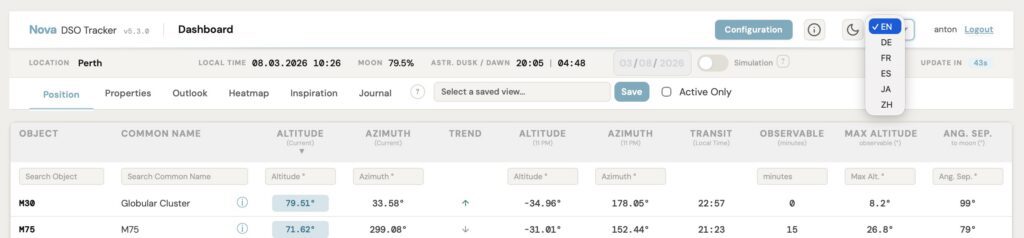
Full UI Translation
The entire interface has been internationalized, including:
- Dashboard – tabs, status strip, table headers, filter placeholders, loading messages
- Config page – tab buttons, rig card labels, download/import menus
- Objects section – all labels, buttons, and help text
- Journal – section headers, form fields, and navigation elements
- Graph view – tooltips, legends, and controls
- Heatmap – legend text and controls
- Modals – About, help, and inspiration banner
- Mobile interface – all mobile-specific strings
Help Documentation
Complete help documentation is available in all 6 languages across 15 help topics, including data management, horizon mask, locations, objects, rigs, search syntax, simulation mode, and more.
CJK Font Support
- Noto Sans JP for Japanese text
- Noto Sans SC for Chinese Simplified
- Astronomical data fields (coordinates, catalog numbers) remain in DM Mono for clarity
Translation Status Banner
For machine-translated locales (ES, JA, ZH), a dismissible banner informs users of the translation status and invites community feedback.
Technical Term Preservation
Nova-specific and astronomical terms are preserved untranslated across all languages: Nova, DSO, SQM, RA, Dec, FWHM, RMS, PHD2, ASIAIR, NINA, OAG, SIMBAD, HFR, FITS, and more.
Enhanced Object Filters
The Manage My Objects filter now supports flexible range expressions for Magnitude and Size:
<15– Less than 15>5– Greater than 5>5 <30– Range between 5 and 30- Plain number – Exact match
Web UI for User Management – contributed by Gilles Morain (Multi-User Mode)
Admins can now manage users directly from the Nova interface without using the command line. A new User Management panel at /admin/users is accessible only to the admin account and supports:
- Create users – username and password with instant feedback
- Activate / Deactivate users – temporarily block access without deleting the account
- Reset passwords – inline per-user password reset
- Delete users – removes login credentials only; all observing data is preserved
The admin account itself cannot be deactivated or deleted from the UI.
CLI Commands for User Management
flask add-user– create a new user accountflask rename-user– rename an existing userflask change-password– change a user’s passwordflask delete-user– delete a user account
Docker Compose Dev Configuration
A new docker-compose-dev.yml is included for contributors and developers building from local source, while docker-compose.ymlcontinues to use the official published image.
Bug Fixes
- Translation completeness – Filled 80+ empty translation entries across Spanish and Chinese
- Placeholder alignment – Fixed Moon Illumination placeholder format in ES and ZH translations
- HTML rendering – Moved HTML formatting from msgid to msgstr for proper rendering in translated content
- Inspiration banner – Fixed partial translations in French and German
- Broken PO files – Removed conflict markers and duplicate entries from ES, ZH, and JA translation files
- Objects count display – Aligned parameter name with i18n placeholder
- Heatmap legend – Added translatable text for heatmap legend
- Graph view – Resolved background color and JavaScript errors
- Dashboard – Fixed missing brackets in column headers and countdown timer display in status bar
Upgrade Notes
- New dependency –
flask-wtfis required for CSRF protection. Runpip install -r requirements.txtto update - No database migration required – Language preference is stored in
UiPref.json_blob - Automatic language detection – Browser language preference is used on first visit, defaults to English
- User management – Available in multi-user mode only (
SINGLE_USER_MODE=False) - Docker Compose – New
docker-compose-dev.ymlavailable for local development
Special thanks to Gilles Morain (@gmorain) for contributing the user management feature – the first external pull request in the project’s history.
Thanks for using Nova DSO Tracker! As always, feedback is welcome — please report any issues on GitHub.