Release Date: 2026-11-22
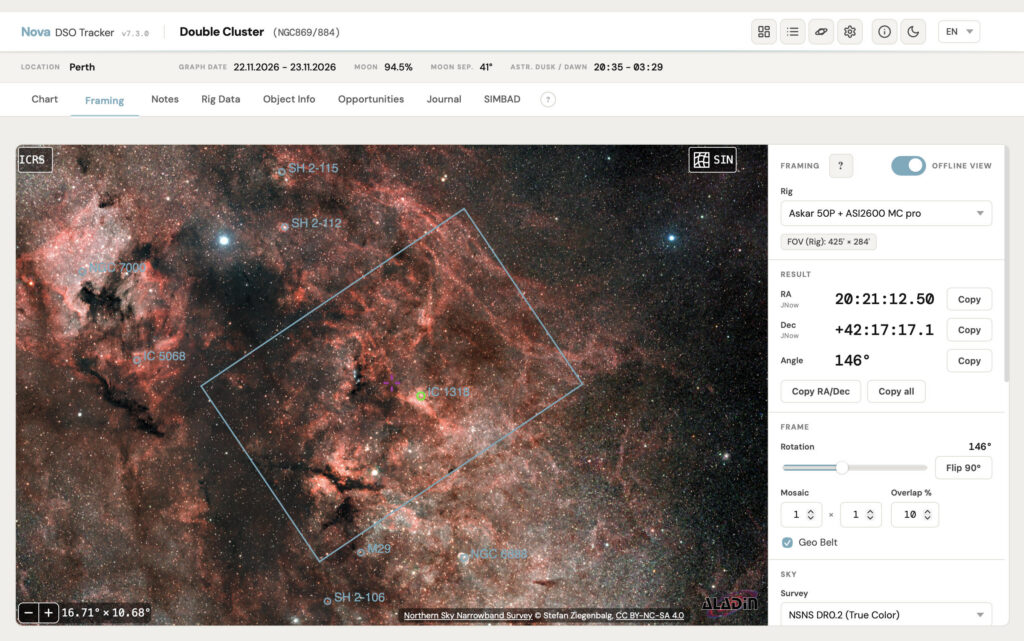
New: All-new Framing
Framing has been rebuilt from the ground up. It is no longer a pop-up window on top of the graph view: it is a tab of its own, with the sky filling the page and every control in one side panel next to it.
- A full tab with a side panel – Rig, Rotation, Survey and Blend, Image adjustments, Mosaic, Scan and Actions are grouped as sections in one panel beside the sky, so the frame stays in view while you work on it.
- One frame centre, one Result block – the panel ends in a Result block with the frame’s RA, Dec (JNow, to match your mount) and angle, each with its own Copy button, plus Copy all. What you see there is exactly what gets saved, copied or sent to your mount.
- Switching rigs keeps your composition – changing the rig now resizes the frame around the current centre instead of jumping back to the object. Only Recenter to object (and the first open of the tab) moves the centre.
- True to north while dragging – the frame angle stays true to north as you drag across the sky, so the angle you read is the angle you shoot.
- Keep north up – an optional switch (off by default) that smoothly straightens the view so north stays at the top while you pan.
- Zoom that fits the whole frame – opening the tab sizes the view to the entire frame, including every pane of a mosaic at its rotation.
- Scan Frame finds the names you know – Scan Frame now shows dark and reflection nebulae and the well-known catalogue names SIMBAD carries: Barnard, LDN, vdB, Ced, RCW, Gum, LBN, Abell planetaries and more. A new Catalog names only checkbox (on by default) hides objects that only have a survey designation such as
PGCC G048.69-05.97; like Min size, it filters instantly without a new request. Dense fields are no longer cut short, labels match Nova’s own object markers, and a scan has a firm time budget, so a slow SIMBAD gives you a clear notice instead of a spinner. Scan Frame is available for rigs up to an 8° field of view. - Make the frame a new target – two ways to turn what is in front of you into a target of its own, without leaving the tab:
- New Target in the panel: type a name and click Create target. The target is placed at the frame centre and your framing is saved onto it. No internet connection is needed.
- Make this my target in the Scan Frame popup: one click puts the target at the scanned object’s position, with the frame you composed saved onto it.
New: Sky surveys that keep working offline
- Survey tiles are cached on your Nova server – the sky images behind the Framing tab now load through Nova itself and are kept on disk, so a field you have looked at before opens instantly and survives a flaky connection. When the main survey server is slow or down, Nova falls back to mirrors.
- Offline view – a switch in the Framing tab shows the sky from what is already stored on disk, without touching the network. In single-user mode Nova switches to it by itself when the internet drops. (Scan Frame needs SIMBAD and is unavailable in Offline view.)
- Offline sky storage – a new section in Configuration → General shows how much space the sky tiles use, lets you set a limit (2 / 5 / 10 / 25 GB or No limit) and clear the browsed sky with one click. In multi-user mode only admins see it.
Things that look different
- Dashboard Trend column – the Trend column is now sized for each language so its header stays on one line, and the width it frees goes to Common Name.
Fixes
- Framing on direct open – opening a Framing link directly no longer races Aladin’s engine starting up.
- Error messages no longer leak internals – the Scan Frame, framing load/delete and new-target endpoints log errors on the server and answer with a translated generic message instead of the raw exception text.
- French “Dec” label corrected.
For self-hosters
- No database changes in this release, and no new Python dependencies.
- New blueprint:
offline_sky— the same-origin/hips/tile proxy (properties, tiles, Allsky, MOC) from a server-side survey whitelist, plus the admin storage API under/api/offline-sky/*(status, limit, clear, and the download/selection/plan routes behind the same guard). In multi-user mode/hips/requires a signed-in, non-guest user. - New route:
POST /api/create_object(create-only, never overwrites; answers 409 with the existing name on a collision). - New modules:
nova/offline_sky_store.py,nova/offline_sky_jobs.py,nova/offline_sky_plan.py. - New on-disk directory:
instance/cache/hips/(or whereverOFFLINE_SKY_DIRpoints). It is created at startup and capped by the storage limit; browsed tiles are evicted oldest-first to stay under it. - The tile cache is on by default. Installs without the key behave as
OFFLINE_SKY_STORE=server. SetOFFLINE_SKY_STORE=offonly as an emergency switch: it turns off the proxy, the storage section and the Offline view switch together, and the browser talks to the survey servers directly again. - New environment variables (all optional, see
.env.example):OFFLINE_SKY_STORE—server(default) oroff.OFFLINE_SKY_DIR— where the tile store lives. Empty meansinstance/cache/hips; a relative path is resolved against the instance folder. If it cannot be written, browsing still works and one warning is logged.OFFLINE_SKY_UI— whether the Framing tab shows the Offline view switch. Empty = auto (on in single-user, off in multi-user);on/offforce it.OFFLINE_SKY_CACHE_MB— starting storage limit in MiB (default2048). A limit picked in Configuration is stored in<OFFLINE_SKY_DIR>/.settings.jsonand wins over this value.OFFLINE_SKY_JOB_RATE_PER_SEC— upstream request rate for background sky jobs (default8).
- Multiple gunicorn workers are safe – the store’s size counter is guarded by a cross-process file lock, so the limit holds with several workers.
- Docker: keep the
instance/volume mounted so the tile cache survives container updates. Plan for up to 2 GB of extra disk use at the default limit. - Back up your
instancefolder before you upgrade.