Release Date: 2026-11-03
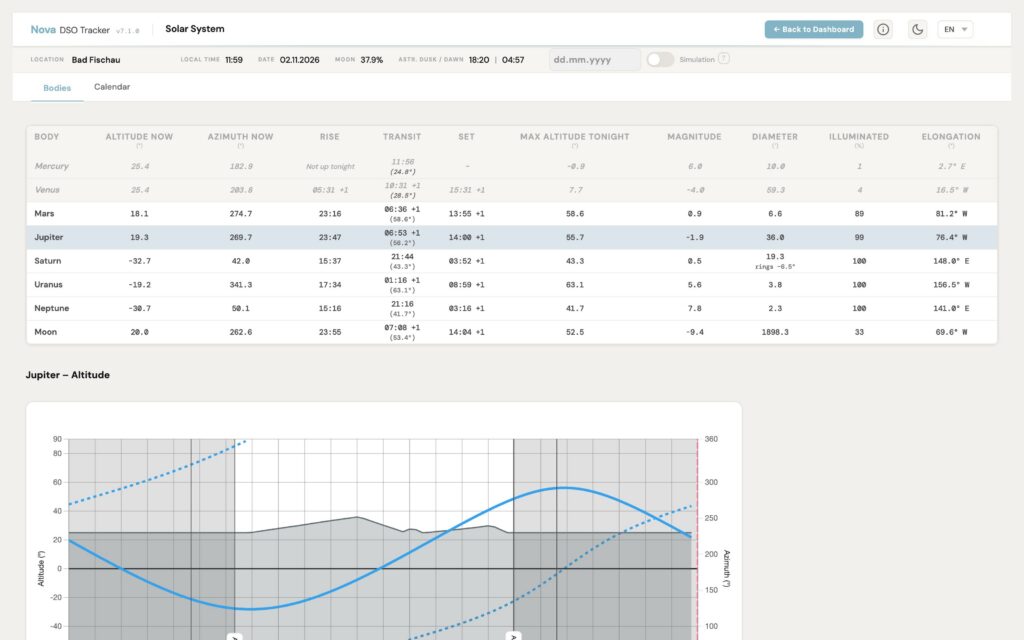
New: the Solar System page
A new page for the planets and the Moon. Open it with the planet icon in the dashboard header. Like the dashboard since 7.0, everything on it is calculated in your browser for the location you have selected.
- Bodies – Mercury to Neptune and the Moon in one table: current altitude and azimuth, rise, transit and set, tonight’s maximum altitude, magnitude, apparent diameter, illumination and elongation (with Saturn’s ring tilt under its diameter). Click a body for its altitude and azimuth chart tonight, or for a month or a year. Bodies that don’t rise or don’t reach your altitude threshold tonight are greyed out.
- Calendar – a second tab with the events worth planning for: oppositions, greatest elongations, planet–planet and Moon–planet conjunctions (and occultations), Venus’s greatest brilliancy and dichotomy, lunar X and V, Jupiter’s double shadow transits and Iapetus’s western elongations. Hover an event for an explanation; a Mars opposition also shows the date of closest approach. Filter by body or event type, or hide the events you can’t see from your location.
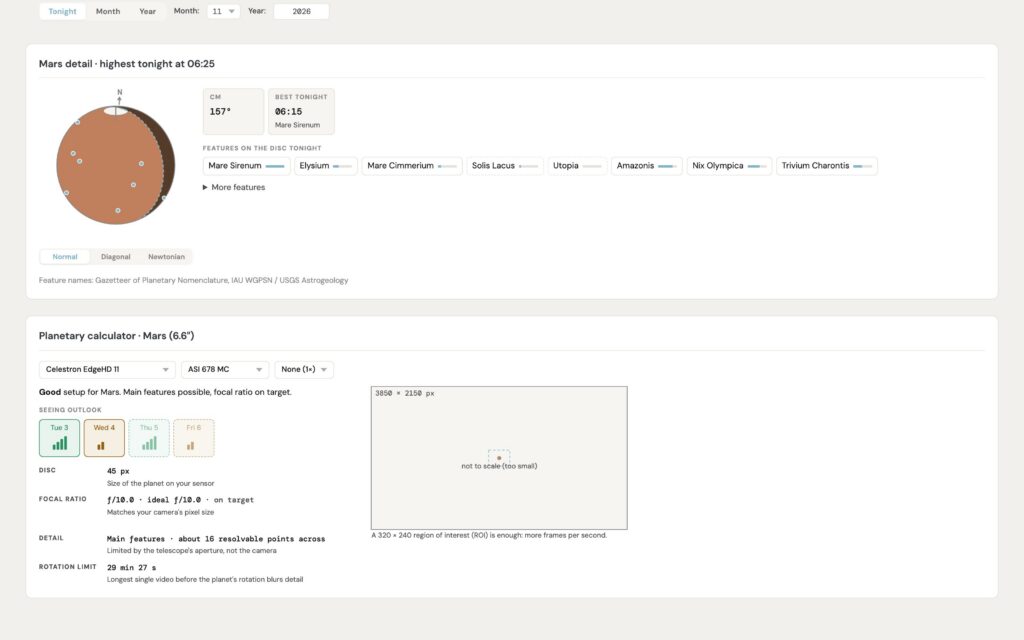
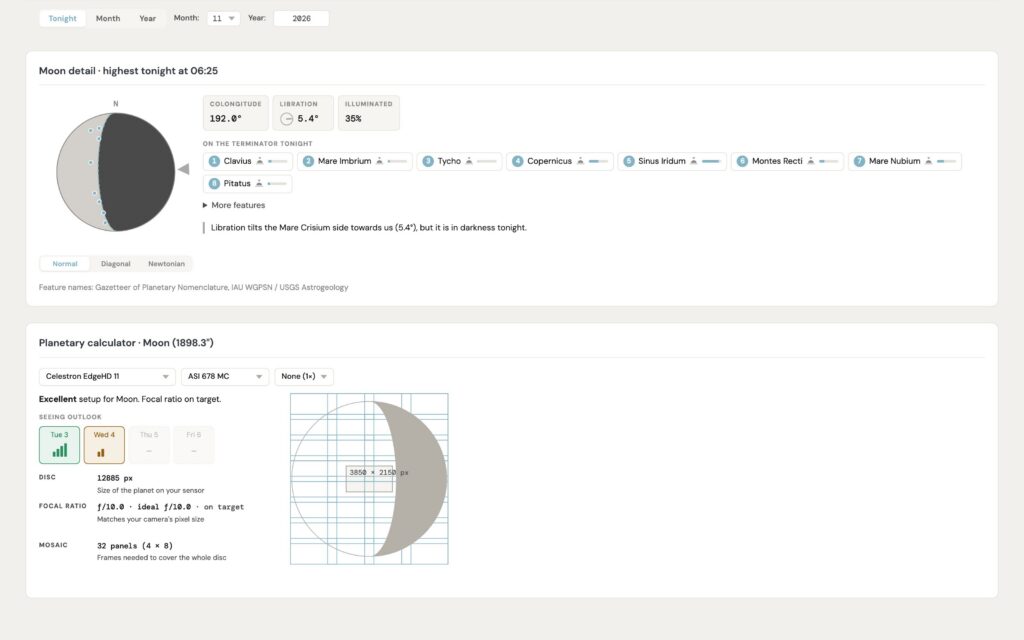
- Planetary calculator – pick a telescope, camera and Barlow from your equipment and see how the selected planet will land on your sensor: the disc size in pixels, whether your focal ratio matches your camera’s pixel size, how much detail the aperture can resolve, how long a single video can run before the planet’s rotation blurs it, and a sensor preview with a suggested region of interest (ROI). For the Moon it counts the mosaic panels needed to cover the disc. A short summary at the top says whether the setup is excellent, good or limited for that planet.
- Seeing forecast – a four-night seeing outlook next to the calculator, from the jet stream over your location. Strong upper-level wind means poor planetary seeing, whatever the clouds do. Hover a night for the details.
- Moon detail – colongitude, libration and illumination, a diagram of tonight’s Moon with the terminator, and the craters, maria and mountains along the terminator tonight, each with how well it is placed. Libration is explained in words: which side is tilted towards you, and whether it is lit.
- Jupiter detail – the Galilean moons in their current positions, the Great Red Spot’s next transit and the central meridian, tonight’s satellite and shadow transits, and the shadow transits of the next nights.
- Mars detail – the central meridian, the best time to image tonight and which surface features face you then.
- Saturn detail – the ring tilt and whether the rings are opening or closing, and the positions of Titan, Iapetus and the inner moons.
- Venus and Mercury – a phase card showing the disc at tonight’s phase, oriented as you will see it, and the window when it is worth looking.
- Your telescope’s view – every detail diagram can be flipped to match a star diagonal or a Newtonian.
- The page is translated into German, French, Spanish, Japanese and Chinese.
Things that look different
- Weather on the Day chart is shown as icons – cloud cover and seeing appear as icons along the top of the object chart instead of words, with a tooltip on hover. The blocks follow your theme, sit on local three-hour boundaries, and line up with the hours the forecast is actually for. When there is no forecast for the night, the chart says so.
- The SIMBAD tab tells you when SIMBAD is down – instead of an empty frame, it now shows a message when the Strasbourg server can’t be reached.
- Adding an object no longer waits for the details – after SIMBAD finds the coordinates, Confirm Add, Edit and Cancel appear straight away and the type, magnitude, size and surface brightness load in the background. If they take longer than 20 seconds, the fields are unlocked so you can fill them in yourself. Magnitude, size and surface brightness are rounded to two decimals.
- Skyglow works out of the box – the skyglow floor on the charts is now calculated by the hosted Nova skyglow service without any setup. A
SKYGLOW_API_KEYininstance/.envstill takes precedence.
More reliable when the sky survey servers are down
- SIMBAD lookups fall back to mirrors – when the Strasbourg SIMBAD server doesn’t answer, Nova tries the Harvard and IDIA mirrors and remembers which one works. Lookups have real timeouts now, so an outage costs seconds instead of minutes.
- Faster object detail lookups – the remote queries behind object details give up after 10 seconds each and 15 seconds in total, so objects with sparse catalogue data (for example LBN 777) load in seconds instead of minutes.
- The Framing Assistant survives a CDS outage – when the CDS sky survey servers are down, the Framing Assistant switches to DSS mirrors (ESA, CASDA) and then to another survey server, with a notice telling you so. It remembers the outage, so the next framing doesn’t wait for it again.
Fixes
- Weather blocks at the wrong hours – 7Timer forecast blocks were placed at the wrong times and could appear outside the hours of the Open-Meteo forecast. Each value now covers its own three hours.
- Offline support no longer gets in the way – the mobile page’s offline cache no longer handles sky survey images, CDS requests and other external requests, so a failed request is reported as a failure instead of looking like an empty answer.
- Rig settings – the Active checkbox is no longer stretched across the full width.
- Translations – corrected French “Size”, Japanese “Magnitude” and “Month”, and “Seeing” in Spanish and French.
For self-hosters
- No database changes. Nothing to migrate, no columns added.
- New routes:
/solar_system(page),/api/upper_wind(upper-level wind for the seeing forecast, from Open-Meteo, cached in memory) and/api/simbad_status(whether the SIMBAD tab can embed Strasbourg). Existing API responses are unchanged. - Great Red Spot longitude – the GRS drifts, so its longitude is fetched by the server at most once a day from
{NOVA_CATALOG_URL}/grs.json(the shipped catalog host whenNOVA_CATALOG_URLis empty) and kept ininstance/cache/grs.json. It runs in a background thread, never delays a page, and an instance without network access simply uses the built-in default.NOVA_DISABLE_BACKGROUND_TASKS=1switches it off. - New outbound requests: the upper-level wind forecast from Open-Meteo (already used for the weather), the daily
grs.jsonfrom the catalog host, and the SIMBAD mirrors at Harvard and IDIA when Strasbourg is down. - Skyglow uses the hosted service key by default; set
SKYGLOW_API_KEYininstance/.envto use your own. - Dependency updates: certifi 2026.10.19, setuptools 84.1.0.
- Back up your
instancefolder before you upgrade.