New Features
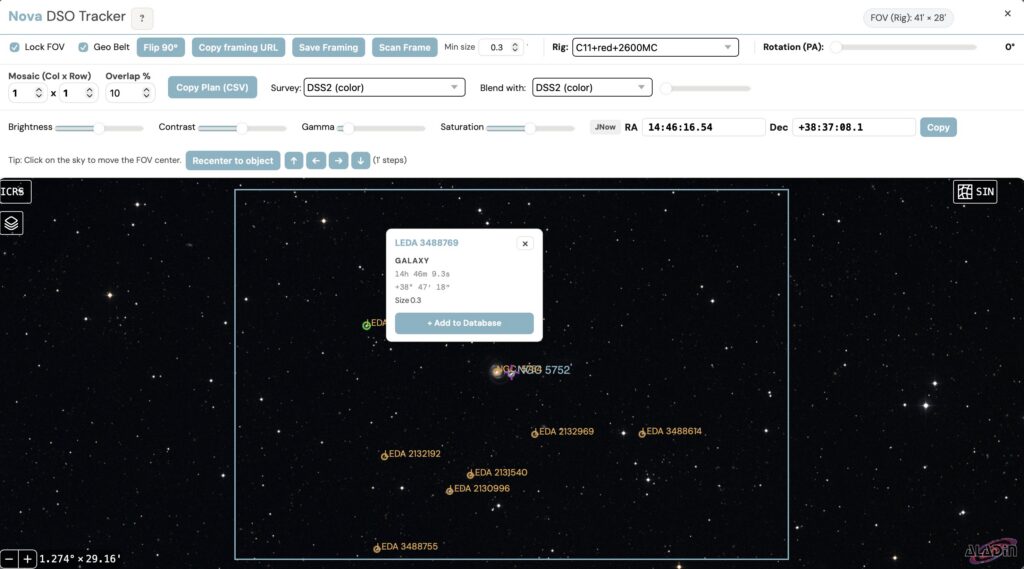
- Scan Frame — Discover DSOs within your current framing rectangle via SIMBAD ADQL search, with magnitude filtering and cached results
- Scan Frame Min Size Filter — Filter discovered objects by minimum apparent size to hide anything smaller than your eyepiece’s resolution limit
- Scan Frame FOV Limit — Scan Frame is automatically disabled when the framing rectangle exceeds a maximum FOV, preventing useless wide-area queries
- Scan Frame Object Popup — Click any discovered DSO to view its name, SIMBAD object type label, RA/Dec in sexagesimal format, Wikipedia summary with link, and an “Add to Database” button
- Proactive Outlook Cache Pre-warm — Weather outlook cache is now pre-warmed on dashboard load to avoid first-look delays
Improvements
- Robust Version Parsing — Pre-release version strings like “5.9b” no longer crash the update checker; non-numeric suffixes are safely stripped
- Upload Size Limits — File uploads are now capped (50MB app-wide, 10MB for ASIAir/PHD2/NINA logs, 5MB for session images) to prevent server strain
- Stuck Button State Fix — Scan Frame button now correctly resets its visual state each time the framing modal reopens
- Outlook Cache Handling — Fixed a crash when the outlook cache pre-warm runs before a location is selected on
g
Bug Fixes
- Fixed scan_frame ADQL query to work with SIMBAD schema change (removed deprecated vmag column)
- Bad SIMBAD rows with unparseable RA/Dec are now skipped gracefully instead of causing a 500 error
- Fixed Scan Frame button getting stuck in disabled state when framing modal reopens
Documentation
- Added Scan Frame documentation (how it works, min size filtering, object popup interaction, FOV limit) to the Framing Assistant help in 6 languages: English, German, Spanish, French, Japanese, and Chinese
Technical
- Extracted
applyMinSizeFilteras a reusable function shared between catalog and scan-frame filtering - Added
/api/scan_frameendpoint with in-memory cache (1-hour per-user TTL) and pytest tests